
Search News
Industry Portal
Popular Tags
Industrial PC Thermal Management Problems That Shorten Uptime
Author
Dr. Isaac Logic
Time
May 12, 2026
Pageviews
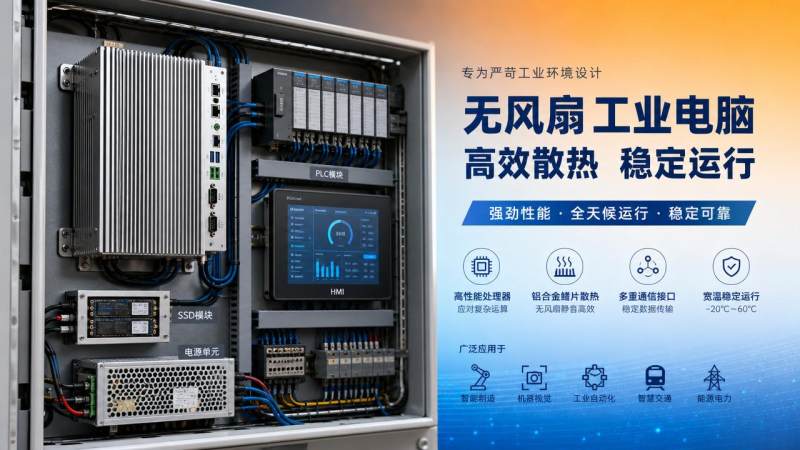
For after-sales maintenance teams, industrial pc thermal management often explains shutdowns that seem random at first. Heat builds slowly, then triggers instability, throttling, storage errors, and shortened component life.
In automation environments, thermal stress rarely stays isolated. It affects PLC communication, HMI responsiveness, edge computing reliability, and the continuity of data collection across connected production systems.
This guide answers the most practical questions about industrial pc thermal management. It focuses on root causes, warning signs, evaluation methods, and actions that improve uptime without guesswork.
What makes industrial pc thermal management different from office computer cooling?
Industrial pc thermal management must work under harsher conditions. Office devices usually operate in clean rooms, stable temperatures, and lighter processing cycles.
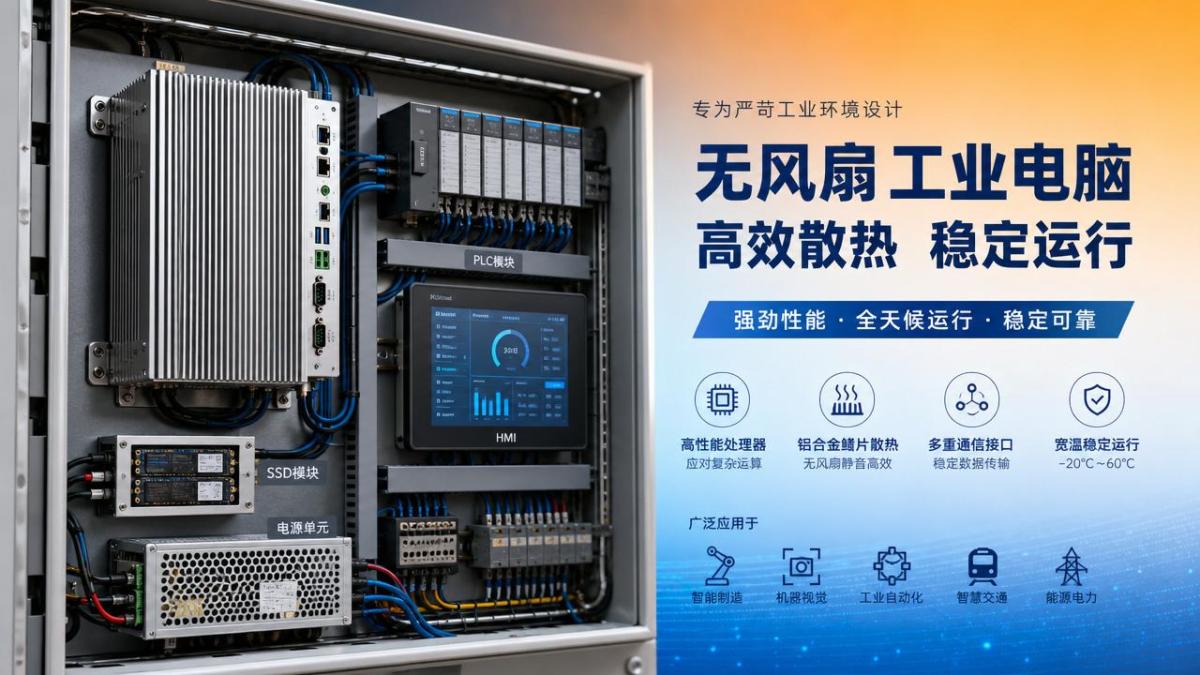
Factory systems often face dust, oil mist, vibration, sealed cabinets, and 24/7 duty cycles. These factors reduce airflow and trap heat around processors, power modules, and storage devices.
An industrial PC may also run vision software, MES connectors, SCADA interfaces, and data logging at the same time. Mixed workloads create thermal peaks that standard cooling assumptions miss.
Another difference is enclosure design. Many industrial units use fanless housings for contamination control. Fanless construction improves sealing, but it demands better heat path engineering.
This is why industrial pc thermal management is not only about installing bigger fans. It includes chassis material, heat sink contact, cabinet spacing, ambient temperature, and cable routing.
- Higher ambient heat from nearby drives, motors, or furnaces
- Restricted airflow inside control cabinets
- Dust accumulation on vents and heat sinks
- Continuous computing loads from automation software
- Limited maintenance access after commissioning
Which thermal problems shorten uptime most often?
The most common issue is thermal throttling. The CPU or GPU reduces speed to protect itself, causing slower response, lagging interfaces, and delayed control-related tasks.
Another serious problem is repeated high-temperature cycling. Components expand and contract over time. This can weaken solder joints, connectors, and storage reliability.
Power supply overheating also causes hidden downtime. Voltage instability may look like software failure, but poor industrial pc thermal management is often the real source.
Solid-state drives are sensitive too. Excessive heat can reduce write performance, accelerate wear, and increase the risk of data corruption during heavy logging or edge analytics.
In cabinets, heat stacking is common. A compact IPC mounted above drives or power supplies may ingest already-heated air, pushing internal temperatures beyond design limits.
Frequent symptoms that point to poor industrial pc thermal management
- Unexpected restarts during peak production hours
- Slow boot time after prolonged operation
- Intermittent communication loss with peripherals
- Touch panel lag or frozen HMI screens
- Storage warnings and abnormal event logs
- Failure rates rising during summer or closed-shift hours
How can thermal risk be diagnosed before a full shutdown happens?
Start with trend data, not isolated temperature readings. A single safe value may hide repeated thermal spikes during workload changes, cabinet door closure, or nearby equipment startup.
Check CPU temperature, SSD temperature, motherboard sensor values, and internal clock behavior. Compare them during idle periods and peak production loads.
Thermal imaging helps identify blocked heat paths. It can reveal hot spots around voltage regulators, memory modules, power supplies, and cabinet corners with weak airflow.
Review the installation environment as carefully as the hardware. Industrial pc thermal management often fails because cabinet fans are undersized or ventilation paths are obstructed.
Dust patterns provide clues. Heavy buildup near filters, vents, or heat sink fins suggests airflow reduction long before alarms or shutdowns appear.
Practical diagnostic checklist
- Record internal temperatures across one full production cycle.
- Inspect cabinet layout around drives, PSUs, and IPC mounting points.
- Check for firmware logs showing thermal throttling or sensor alerts.
- Measure ambient temperature at several cabinet heights.
- Verify filter cleanliness and fan direction.
- Confirm thermal paste and heat sink contact during major servicing.
What installation mistakes create industrial pc thermal management failures?
One common mistake is treating the IPC as an isolated device. In reality, it shares thermal space with inverters, power supplies, networking gear, and cable bundles.
Mounting too close to the cabinet roof is another issue. Hot air rises, so the top zone often becomes the worst place for stable industrial pc thermal management.
Poor clearance around fanless fins also causes trouble. Heat sinks need open space to transfer heat effectively. Tight mounting surfaces weaken natural convection.
Undersized cabinet cooling is a frequent design gap. Teams may size ventilation for nominal power, then later add software loads, I/O cards, or storage without recalculating heat output.
Another mistake is ignoring seasonal variation. Industrial pc thermal management that appears acceptable in winter may fail during summer peaks or during longer sealed-door operation.
How should industrial pc thermal management be evaluated when selecting or upgrading systems?
Look beyond processor specifications. Reliable industrial pc thermal management depends on enclosure design, tested operating range, storage placement, and actual derating under continuous load.
Ask whether temperature ratings apply to full performance or reduced performance. Some systems meet high ambient limits only when compute demand is limited.
Ingress protection matters too. A sealed enclosure can protect against dust and moisture, yet still require careful heat transfer planning at the cabinet level.
For smart manufacturing applications, include software behavior in the evaluation. AI inference, machine vision, and multi-protocol data integration can change the thermal profile dramatically.
Cross-check thermal claims against recognized engineering standards and transparent test conditions. This supports more dependable comparisons across automation hardware choices.
Selection questions worth asking
- What ambient temperature was used during performance testing?
- Was the test done inside a cabinet or open air?
- How does the system behave under sustained peak load?
- Are SSD and power module temperatures monitored separately?
- What maintenance intervals are needed to preserve cooling performance?
What preventive actions improve uptime without major redesign?
The fastest improvement is often thermal housekeeping. Clean filters, confirm airflow direction, remove cable obstructions, and restore cabinet spacing around critical heat sources.
Adjust workload scheduling where possible. Heavy analytics, backups, and batch data exports can be moved away from thermal peak periods.
Set temperature thresholds for maintenance alerts, not just emergency shutdowns. Early warning supports planned service instead of disruptive downtime.
If the IPC is fanless, review mounting orientation carefully. Some heat sink designs perform best only in specific positions that support natural airflow.
For sites with frequent environmental fluctuation, add periodic thermal audits. Industrial pc thermal management should be verified after layout changes, software updates, or production expansion.
FAQ summary table
Industrial pc thermal management is a reliability discipline, not a minor maintenance detail. Better thermal control protects uptime, stabilizes automation performance, and lowers recurring service risk.
Use temperature trend checks, installation review, and workload analysis together. That combination reveals why failures happen and which improvements will deliver the fastest operational gains.
For smart factory environments, thermal decisions should be verified with transparent engineering data and practical field conditions. That approach reduces uncertainty before the next shutdown does it first.
Recommended News
- 2026/10/24Car Spare Parts: How to Check Fitment and Avoid Ordering the Wrong PartOrder car spare parts with confidence. Learn how to verify VINs, OEM numbers, and fitment details to avoid costly mistakes and choose the right replacement first time.
- 2026/10/23How Do You Select a Motion Control System for Synchronized Axes?How do I select a motion control system for synchronized axes? Discover key timing, feedback, and performance checks to choose confidently and reduce costly integration risks.
- 2026/10/23Integrating End-of-Line Sortation with Packing Stations and Conveyor ControlsOptimize end of line sortation with coordinated packing stations and conveyor controls. Learn how to prevent bottlenecks, improve routing accuracy, and handle exceptions reliably.